Every folder explained
What it is, which tool made it, what happens if it goes, and a link to the documentation that says so. No guessing from folder names.
Free and open source · Windows, macOS, Linux
Cache Vent finds model weights, node_modules, virtual environments and caches on every drive, explains what each folder is, and moves only what is safe into a quarantine you can undo.
Windows 10 and 11 · 7.9 MB · no installer, no account · other platforms
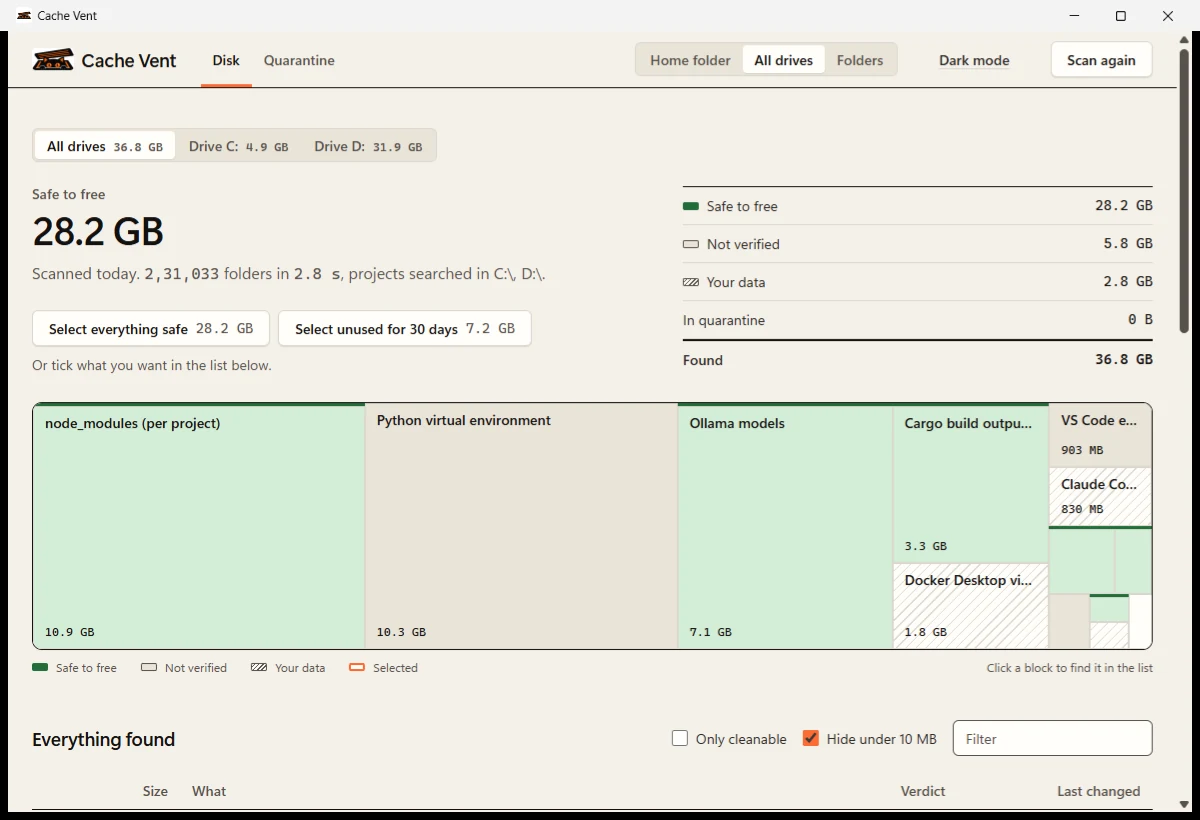
Scanned 231,033 folders across two drives in 2.85 s on a developer laptop
The problem
Disk analyzers show you big folders. They can't tell you that 4 GB is a model you can download again in a minute, or the only copy of six months of chat history. Cache Vent can, because every verdict comes from the tool's own documentation.
Found on one developer laptop
Why Cache Vent
What it is, which tool made it, what happens if it goes, and a link to the documentation that says so. No guessing from folder names.
Cleaning renames items into a quarantine on the same drive. It takes a moment, uses no extra space, and one click puts everything back.
Ties node_modules, venv, Poetry and pipenv environments to their projects, shows package sizes, and flags environments whose project is gone.
No account, no telemetry, no network requests. The app runs in its own window on your machine and talks only to itself.
Nothing leaves your machine. Nothing is deleted until you say so.
How it works
Pick your home folder, every drive, or specific folders. Reading changes nothing on disk and takes a few seconds.
Each item is marked safe to free, not verified, or your data, with what happens if it goes and where that claim comes from.
Select what you want gone, or pick everything unused for 30 days. It moves aside at once and can be restored for 14 days.
What it finds
Tools are described in plain YAML files. Adding one takes no code, only the paths and a source for what happens when they go.
Speed
Measured on an Intel Core i7 11850H laptop with an NVMe SSD, median of three warm runs. Cache Vent does more work than the baseline: it matches definitions, finds projects and sizes packages.
Peak memory 41 MB
Peak memory 15 MB
Safety
These rules are enforced in code and covered by tests, not left to a settings page.
Nothing outside Cache Vent's own folder and quarantine is ever written.
Symlinks and junctions are listed, never entered, so nothing outside a folder is touched.
Only items backed by a cited source can be selected. Everything else stays not verified.
Chat histories, outputs and virtual disks are shown but can never be selected.
Home folders, drive roots and anything still in use are refused at the last moment.
Items inside OneDrive, Dropbox, iCloud or Google Drive folders are never moved.
FAQ
Yes. Scanning only reads. Cleaning moves items into a quarantine on the same drive instead of deleting them, and anything moved can be restored for 14 days. Items marked your data or not verified cannot be selected at all.
It means no documented source yet confirms what happens when that folder is removed. Cache Vent still shows its size and what it is, but it will not offer to clean it. Verdicts only change when someone adds a source to the definition.
No. There is no account, no telemetry and no update check. The desktop window talks only to a local server bound to 127.0.0.1 and protected by a token that changes every launch.
The build is not code signed yet, so Windows does not recognise the publisher. Installing with the PowerShell command in the install section avoids the prompt and checks the file's SHA256 checksum for you. If you downloaded the app in a browser, choose More info, then Run anyway.
Install it with the Terminal command instead of a browser download. Files fetched from Terminal aren't flagged by Gatekeeper, and the installer signs Cache Vent.app on your Mac and clears the download flag, so it opens from Launchpad like any other app. No Apple account, admin password or System Settings changes are needed. The script is short and readable: install.sh.
Only until you reinstall. Each item shows the command that brings it back, such as npm install or uv sync. If you would rather not, restore it from the quarantine in one click.
In a .cachevent-quarantine folder on the same drive as the item, so moving is a rename and takes no extra space. The space comes back when items are purged, automatically after 14 days or sooner if you empty it.
Yes. Select items and choose Delete. You will see every path and its size and confirm before anything is removed. The same rules apply, so your data and unverified items still cannot be deleted.
Yes. macOS 13 Ventura or later on Apple silicon and Intel, and Linux on x64 and ARM64. Windows gets its own native window and the fastest scanner; on macOS and Linux the interface opens in a Chrome, Edge or Brave app window, or your default browser. The Linux build is tested end to end on every change; macOS support is newer and marked as a preview.
On Windows it reads each folder in batches of about 64 KB of entries with sizes included, instead of one system call per file, and walks folders in parallel with a fixed number of workers. It never reads the same folder twice.
Yes. Cache Vent is free and open source under the MIT license, for personal and commercial use.
Free and MIT licensed. Nothing is deleted without your say, and anything moved can be restored for 14 days.
irm https://cachevent.kelados.in/install.ps1 | iex| Platform | SHA256 | Size |
|---|---|---|
| Windows x64CacheVent-windows-x64.exe | 3ea6b5c82c858b1f…5bb0aa76 | 7.9 MB |
| Windows ARM64CacheVent-windows-arm64.exe | 7e40d75945dd1fd4…c7a30639 | 7.1 MB |
| macOS Apple siliconcachevent-macos-arm64 | b2a1b014fbcbebbd…97d17ae8 | 6.8 MB |
| macOS Intelcachevent-macos-x64 | 4b118f00ae1b0b7b…bf1c77b7 | 7.4 MB |
| Linux x64cachevent-linux-x64 | 53c54dbb53cf18c8…95d9cec4 | 7.2 MB |
| Linux ARM64cachevent-linux-arm64 | e739346279f01571…f195415d | 6.7 MB |
Full hashes are in SHA256SUMS.txt. The install commands check them for you. On macOS and Linux, a downloaded file needs chmod +x before it runs; the install command is the easier path.
Every build is also a CLI, with stable JSON output for scripts.
cachevent scan --all-drives
cachevent clean --dry-run PATH
cachevent restore ID
cachevent scan --json > report.json